 Simone
我把hosts文件删了,导致tinyumbrella软件无法使用,有什么解决办法吗
的有关信息介绍如下:解决办法:在C:\WINDOWS\system32\drivers\etc目录下创建一个记事本,命名为hosts.txt,然后把下列代码复制到里面去:# Copyright (c) 1993-1999 Microsoft Corp.[/pre]## This is a sample HOSTS file used by Microsoft TCP/IP for Windows.## This file contains the mappings of IP addresses to host names. Each# entry should be kept on an individual line. The IP address should# be placed in the first column followed by the corresponding host name.# The IP address and the host name should be separated by at least one# space.## Additionally, comments (such as these) may be inserted on individual# lines or following the machine name denoted by a '#' symbol.## For example:## 102.54.94.97 rhino.acme.com # source server# 38.25.63.10 x.acme.com # x client host127.0.0.1 localhost [/pre]
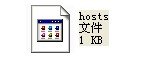
保存 然后把.TXT后缀删除掉(如果没有出现.txt后缀名,请双击我的电脑→工具→文件夹选项→查看→隐藏已知文件类型的扩展名,把前面的√去掉,确定),形成
然后再把这个hosts文件复制到C:\WINDOWS\system32\目录下。OK!
运行tinyumbrella软件试试~